
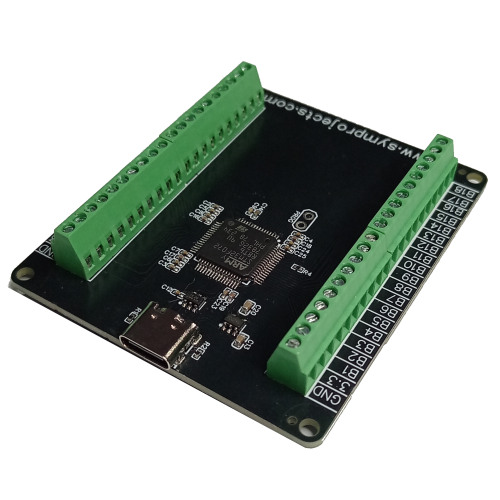
The JC32 is a powerful yet extremely easy-to-use joystick controller. It allows you to add analog axes, push buttons, rotary encoders, and toggle switches to your projects with minimal setup.
Characteristics
The main characteristics of the JC32 joystick controller are:
- 32 separate digital inputs.
- It can handle push buttons, rotary encoders (up to 16), toggle switches.
- Unlikely the JC24 joystick controller, the digital inputs are not organized in a matrix, but each input has its own input terminal. This also means that connections are extremely simple and diodes are no longer required.
- 4 10-bits (1024 steps) analog inputs are available for connecting potentiometer, pedals etc…
- All the inputs of the JC32 Joystick Controller use screwless terminal. Just push the wires into the terminal.
How to Connect Buttons and Analog Inputs to Your JC32 Joystick Controller

Since each digital input has its own dedicated terminal, wiring is quick and straightforward. Simply connect each button to its assigned input terminal and to the GROUND connection.
Analog inputs (typically potentiometers) are connected to the 3.3 V, GROUND, and an analog input, as shown in the illustration above.
Rotary Encoders
Rotary encoders are devices with three pins that function as two virtual buttons. When the encoder is turned clockwise, the controller simulates a press and release of one button. Turning it counter-clockwise simulates a press and release of the second button.

Connecting a rotary encoder is straightforward:
- Connect the center pin of the encoder to the GROUND terminal on the JC32 Joystick Controller.
- Connect the two outer pins to two adjacent digital inputs (for example B01 & B02, or B03 & B04). Always start with an odd-numbered input — for example, use B09 & B10 or B11 & B12, not B10 & B11.
Toggle Switches
Toggle switches can be set to ON or OFF, with the corresponding input appearing as continuously pressed or released.
When properly configured, toggle switches can also simulate a button press and release each time they are moved between OFF and ON (and vice versa). This is especially useful for simulator functions that use the same input to toggle a feature on and off, where a toggle switch feels more natural than a push button — for example, vehicle lights.
The Configuration Tool

The Configuration Tool, available in the website’s Download area, is used to define which digital inputs on the JC32 are assigned to push buttons, rotary encoders, or toggle switches.
The Pulse Width setting specifies the duration (in milliseconds) of the virtual button press generated when a rotary encoder is turned or a toggle switch is operated.
In most cases, you won’t need to change this value — the default setting of 20 ms works reliably in most situations. Shorter pulse widths, such as 5 ms or 10 ms, may be too brief to be detected by some simulators, including iRacing or Assetto Corsa.
The final configuration option controls the detent position of rotary encoders. A detent is the physical “click” you feel as the encoder rotates.
If you experience multiple button presses for a single click, you’ll need to adjust the detent settings by disabling some positions. Your rotary encoder’s datasheet provides the necessary information to configure this correctly. Alternatively, you can experiment with different combinations — the number of possible configurations is limited.
The image below illustrates (in blue) how the signals on pins A and B change as the rotary encoder is turned clockwise (CW) or counter-clockwise (CCW), with the center pin connected to ground. The four possible detent (click) positions are shown in black and correspond to four different A/B pin states.

Custom Firmware
If you want to integrate the JC32 Joystick Controller into your own products — such as button boxes or wheels — a custom firmware version is available that displays your company and product names. This service is free, though a minimum order quantity may apply.
| 3DModelAttributeGroup | |
| 3DModel | https://www.symprojects-forum.uk/3DObjects/JC32.stl |
JC32 Joystick Controller
- Product Code: JC32 Joystick Controller
-
£22.50
Available Options
Related Products


Rotary Encoder
CTS Electronic Components 288T232R161A2 rotary encoder.Includes black plastic knob.Detent Points:&nb..
£4.80

Toggle Switch
Heavy duty toggle switches.They can be connected to the JC24, JC32, JC-LED joystick controllers and ..
£2.90
